How Many Blog Posts Do You Need to See SEO Results?
Published a few blog posts and still waiting for search traffic? Start with three to five posts that answer different questions about one topic. Then use Google Search Console to decide whether to fix an indexing issue, improve an existing post or cover the next question your readers have.
Opus Rank
Team ·

You’ve published four posts and checked Google Search Console. One post gets impressions, another gets a few clicks and two show no activity. How many blog posts do you need to see SEO results?
Google publishes no minimum post count for ranking. For a small team covering one narrow topic, three to five posts is a practical first batch. Use that number to plan the work. Then check which pages Google has indexed, which searches show your posts and whether those searches bring visitors. Each signal helps you decide what to fix or publish next.
What Counts as an SEO Result From Blogging?
A post can start earning search visibility well before it brings regular traffic or signups. Track those outcomes separately so you can see where progress stalls.
From indexing to impressions and clicks
Google’s guide to how Search works explains that an indexed page can appear in search results. When your result appears under the conditions Google measures, the Search Console Performance report records an impression. A click means someone selected the result.
Those metrics tell you what happened in Google Search. To see whether visitors started a trial or signed up for a newsletter, check those actions in Google Analytics. Google explains how to use Search Console and Analytics together.
How Many Blog Posts Do You Need to See SEO Results When Starting Out?
The size of your first batch depends on how many distinct questions readers have and how many posts your team can review properly.
Build a three-to-five-post batch around one topic
Say a project management software company wants to help small agencies onboard new clients. Its first four posts could cover the full onboarding process, the client intake form, the handoff from sales to delivery and milestone tracking.
Each post gives the reader something different to do. The onboarding guide can link to the intake form under a phrase like “build a client intake form.” Descriptive links help readers find the next step and help Google discover and understand related pages. See Google’s SEO Starter Guide.
Let search intent determine when to split a topic
Search intent is what someone wants to accomplish when they type a query. Compare the leading results for “client intake form” and “client intake questionnaire.” If both searches surface similar templates, one page may serve both. A sales handoff checklist covers a different task and can stand on its own.
If the blog already has an onboarding guide, read it before drafting another page. Start with the reader question that the existing guide leaves unanswered.
How to Tell Whether to Publish More Blog Posts
Set a review date a few weeks after publication and filter the Search Console Performance report to the first batch. Once enough data is available, compare equal date ranges. Google’s SEO Starter Guide recommends allowing time to assess changes because their effects can take weeks or longer to become visible.
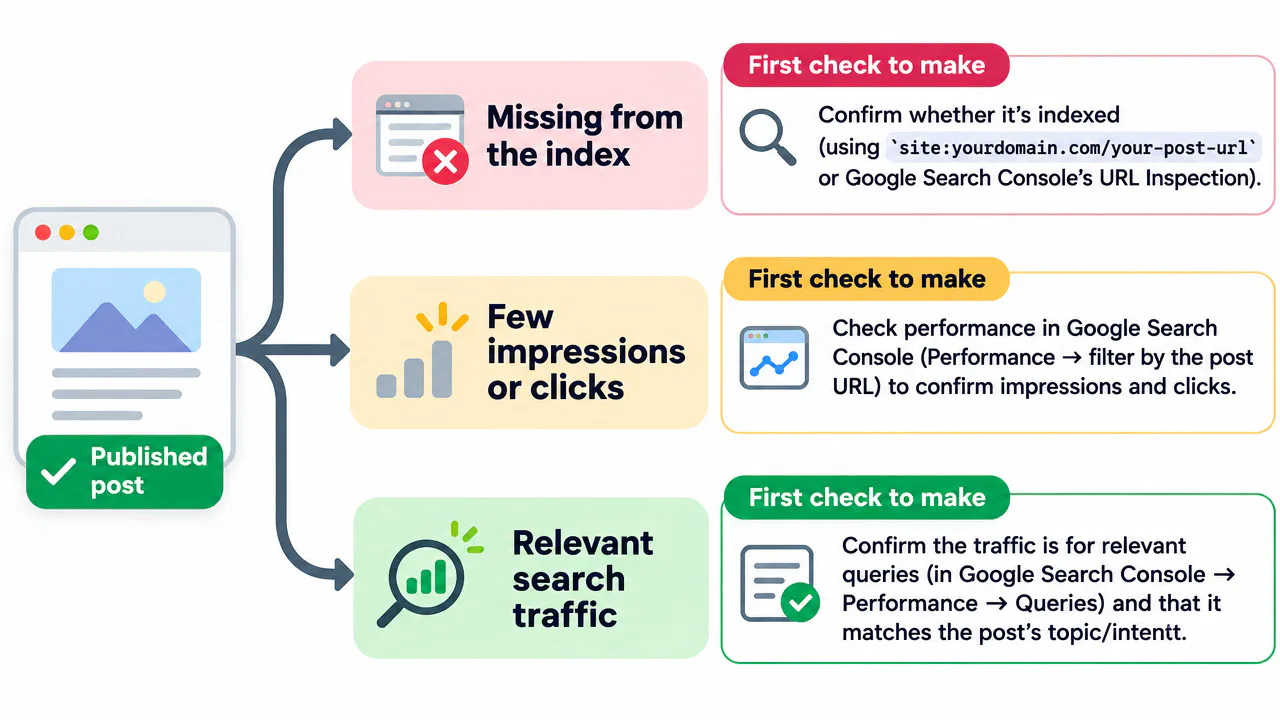
If a post is missing from Google’s index
Open URL Inspection and check the reported reason. The post might still carry a noindex directive, which tells Google to exclude it from the index. Google might also have selected another URL as the main version. Investigate the reported issue before drawing conclusions about the topic.
If a post is indexed but earns few impressions or clicks
With few impressions, check whether people search for the topic and whether the post answers the same question as the leading results. A general onboarding guide may offer little help to someone looking for a ready-to-copy intake form.
If the post earns relevant impressions but few clicks, check its average position for those queries. A result that appears low on the page has limited visibility. When the position looks competitive, check whether the title clearly describes what readers will get.
If relevant queries already bring visitors
Look for a follow-up question that deserves its own post. Visitors who find the intake form may also need a checklist for their first client kickoff call. If the page attracts the right readers but few take the next step, review whether the offer fits what brought them there.
Frequently Asked Questions
Can one blog post rank on Google?
Yes. An indexed post can appear when Google considers it relevant to a query. A specific task, such as drafting a client intake form, gives a single post a clear purpose.
How long does it take to see SEO results from blogging?
Check for early signals after a few weeks and allow more time if the data is sparse. Indexing, impressions, clicks and signups each tell you something different about the post’s progress.
How often should a small business publish blog posts?
Choose a schedule that leaves time to research, review and update each post. Google’s helpful content guidance says adding lots of content solely to make a site look fresh won’t improve rankings.
Should I update an existing post or write a new one?
Update the existing page when it already serves the reader’s task. Write a new post when the question needs a different answer or format.
Conclusion
How many blog posts do you need to see SEO results? Start with three to five if that covers a narrow topic your team can handle well. Set a review date when you publish. Check indexing first, then look at which queries earn impressions and clicks. Use those findings to choose between fixing a page, expanding an existing answer or covering the next reader question.