How to Prioritize Long-Tail Keywords for a New Site
When your site is new, every page takes time you can’t spend on another. Learn how to evaluate long-tail keywords by search intent and competition, group related queries on one page and use Google Search Console to decide what to publish next.
Opus Rank
Team ·

A new site can have fifty keyword ideas and time to publish only three pages. The hard part is deciding which ones deserve that time.
If you’re figuring out how to prioritize long-tail keywords for a new site, start with the reader’s task. Long-tail keywords are queries that get relatively few searches compared with the most popular terms. Once you know what readers want, you can check who already serves that need and decide which queries belong on your first pages.
Create a List of Long-Tail Keywords
Start with one problem your audience needs to solve. If your site serves small marketing teams, start with creating a repeatable SEO content brief. Look through sales calls, support emails or customer conversations for the words people use to describe that task. Expand the list with Google Autocomplete and People Also Ask when those features appear.
Record What the Searcher Wants
For each phrase, write down the task, the likely page format and where the idea came from. Someone looking for an SEO content brief template probably wants something they can copy. Record estimated volume if available and keep recurring customer questions visible when the numbers are sparse.
How to Prioritize Long-Tail Keywords for a New Site by Fit and Feasibility
Put the strongest candidates through two checks before committing. Does this query attract the people your site serves? Can the team produce a page that has a credible chance of ranking? If several candidates pass both checks, compare estimated demand and the time each page would take. Ahrefs’ keyword strategy guide uses audience and business fit alongside ranking feasibility to set priorities.
Check Search Intent Against the Live Results
Search intent is what someone wants to accomplish with a query. Search the phrase in your target market and note which formats dominate the organic results. A results page full of downloadable templates suggests that readers expect a usable document. A results page full of product comparisons suggests that readers want help evaluating options.
Look for a Gap the Site Can Actually Fill
Read the leading pages and find a concrete way to improve the answer. If the templates are blank, a completed example can show readers how much detail belongs in each field. If the leading pages already do that well, look for a more specific task your team can cover.
Use keyword difficulty scores to decide which results to inspect first. Semrush’s long-tail keyword guide describes its score as an estimate of how hard it is to reach Google’s top ten results. Publish a strong fit first, defer work that needs more evidence and drop topics outside your audience’s needs.
Group Related Queries and Choose What to Publish First
Group queries when the same pages rank for them and one answer would serve both searches. Ahrefs calls these supporting long-tail keywords because they’re less common ways to search for the same topic. The Google SEO Starter Guide explains that its systems can match a page to related queries even when it doesn’t use every exact phrase.
Worked Example for a New SEO Content Site
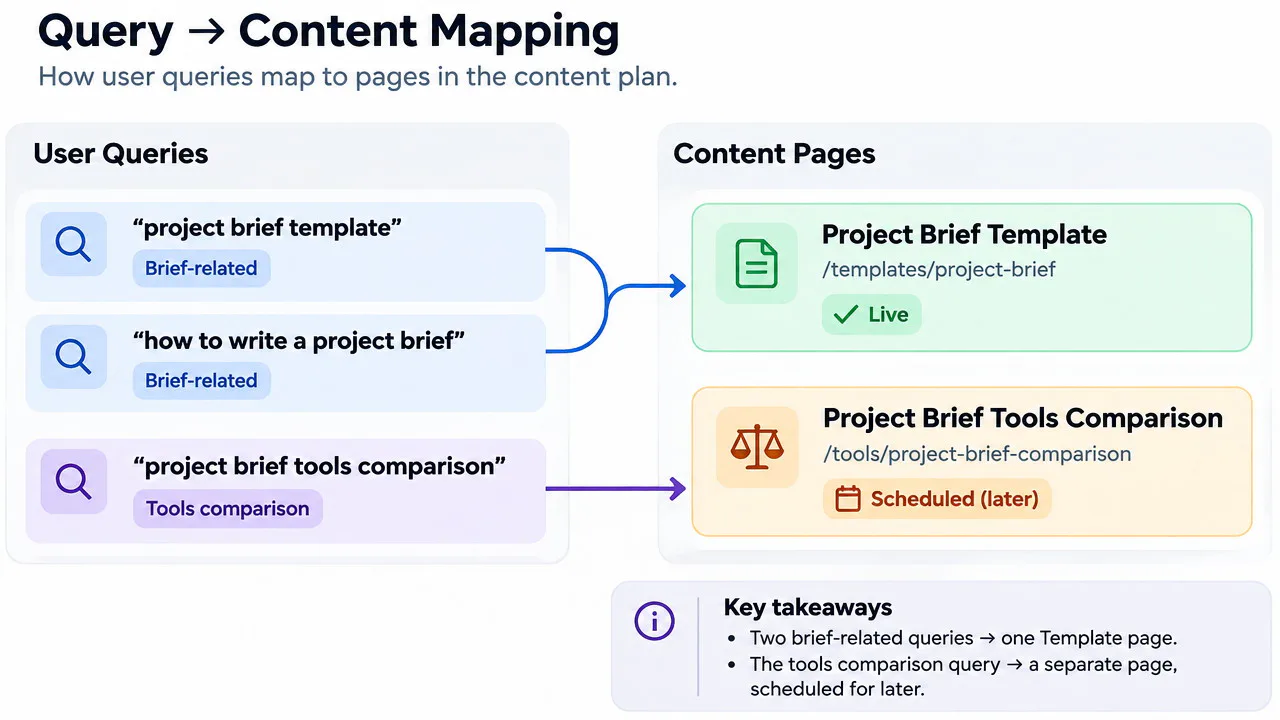
Say a new site shortlists “SEO content brief template for small teams” and “small team SEO brief example.” If the results overlap and readers need both deliverables, publish a single page with a copyable template and a completed brief. A reader can see how the template works and use it immediately.
Keep “best SEO content tools for small teams” on the list as a separate comparison. If credible coverage requires testing tools you haven’t tried, publish the template first and schedule the comparison after testing.
Reprioritize With Google Search Console
Once a page earns impressions, use the Search Console Performance report to see which searches bring it into view. Filter by page and open the Queries tab to review impressions and clicks. Compare similar date ranges once the page has enough activity to show a pattern.
Decide Whether to Update a Page or Create One
Suppose the template page keeps appearing for searches about what to put in an SEO brief. Clarify the fields those searches mention or add a second example for a different use case. A recurring query about reviewing a freelancer’s draft may warrant a separate checklist. Allow for gaps because Google’s query reporting hides some searches for privacy and limits which rows appear.
Conclusion
Knowing how to prioritize long-tail keywords for a new site makes the first publishing decision easier. Pick one group of related queries and build the page that best answers the shared need. Once it earns impressions, let those queries help you choose what to improve or publish next.
Frequently Asked Questions
Are Zero-Volume Long-Tail Keywords Worth Targeting?
Yes, if repeated customer questions or related searches suggest the need is real. A zero in a keyword tool is an estimate. Try covering the question on a relevant page before committing to a standalone post.
What Keyword Difficulty Score Should a New Site Target?
Start by reviewing the lower-scoring terms in your own shortlist. Then inspect the competing pages for each one. If a low-scoring query calls for original testing your team can’t do yet, defer it.
How Many Long-Tail Keywords Should One Page Target?
Pick one primary query to give the page a clear focus. Cover variations where they help readers complete the same task. For instance, a single brief template can answer questions about both its structure and how to fill it out.